Watch the bus
Watch telegrams as they happen, read a single value, see the installation in a browser, and keep a history you can query later. Everything on this page only listens, except a read, which asks one device for one value.
Watch and decode the bus
An illustrative exchange:
You:        What just happened on the bus?
Assistant:  (calls knx_recent_telegrams)
            The weather station raised the wind alarm. A moment later
            the hallway push button switched the hallway light on, and
            the switch actuator reported it on.
You:        Tell me when someone presses a button in the hallway.
Assistant:  (calls knx_wait_for_telegram)
            Hallway push button just sent "on" to Hallway light.
knx_recent_telegrams returns the latest telegrams the server has decoded, filtered by group address or sender. knx_wait_for_telegram waits up to five minutes for the next matching one. A secured telegram arrives decrypted when the server holds its key.
$ bussard monitor
12:03:41.221  1.1.7 Weather Station    → 3/0/0 Wind Alarm           = Alarm (1.005, obj "Wind Alarm")
12:03:44.809  1.1.1 Push Button Hallway → 0/0/0 Hallway Light Switch = On (1.001, obj "Rocker 1")
12:03:44.981  1.1.3 Switch Actuator     → 0/0/1 Hallway Light Status = On (1.001)
Each line is one telegram: the sending device, the group address it went to (a group address such as 0/0/0 is the shared channel a button and an actuator both use), its name, and the decoded value. Flip a switch and watch it name itself.
Narrow the stream with --filter 3/2/0,1/0/: group addresses, group-address prefixes, or sender addresses such as 1.1.30. --json prints one JSON object per line for other tools.
Secured telegrams (KNX Data Secure) decode only with the keyring: pass --keyring <file.knxkeys> and set the password in BUSSARD_KEYRING_PASSWORD. Decoded ones are marked [secured].
A group address that is not in your project shows as raw hex. Give it a dpt in groups.toml (its data type, which tells bussard how to decode the value), or let the assistant do it, and it decodes from then on.
Read a value
You:        Is the wind alarm on right now?
Assistant:  (calls knx_read_group)
            Wind alarm answered: no alarm.
knx_read_group sends one read request and returns the decoded answer. The default server may send reads; a server started with --passive does not offer the tool.
$ bussard read 3/2/0
read sends one read request to the group address and prints the typed answer. It exits non-zero when nothing answers within 3 seconds. --json prints the result as one object, with answered set to false when no answer came.
A secured group address needs --keyring. Without a key for it, read refuses before sending anything.
See the installation in a browser
You:        Show me the installation in the browser.
Assistant:  (calls knx_viz)
            Open http://127.0.0.1:52133.
knx_viz starts the page inside the server and answers with its address. The page shows the telegrams the server already receives, so it takes no extra tunnelling slot. It is read-only in every tier, --passive included, and stops when the server stops.
$ bussard viz
bussard viz serving on http://127.0.0.1:8080 (Ctrl-C to stop)
read-only: group writes return 403 (pass --allow-writes to enable them)
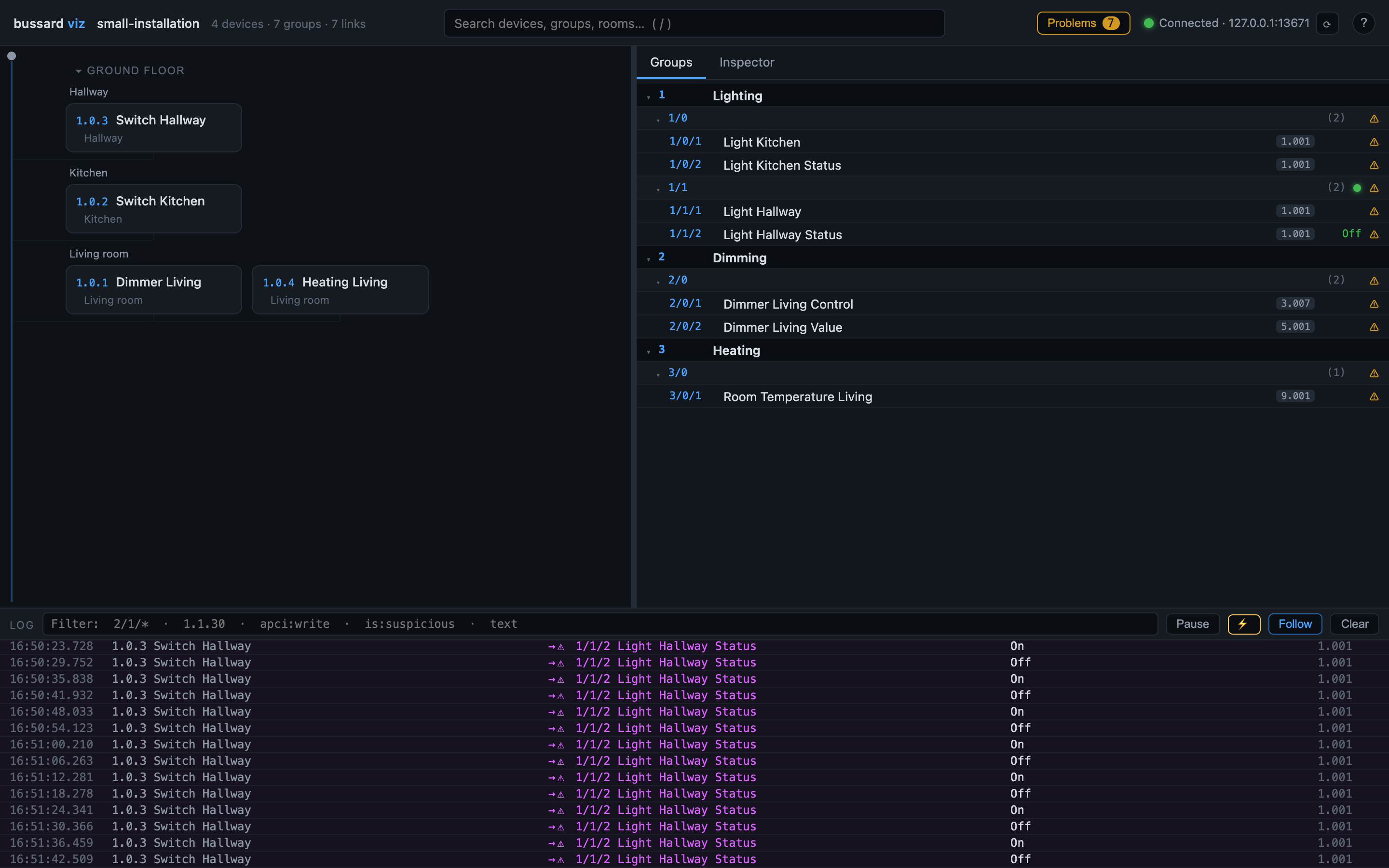
Open the address. You get every device drawn along the bus by floor and room, the group-address tree, and live telegrams as they happen. Select a device or a group address to see its links, senders and listeners. With no reachable gateway the page still shows your project, without live traffic.
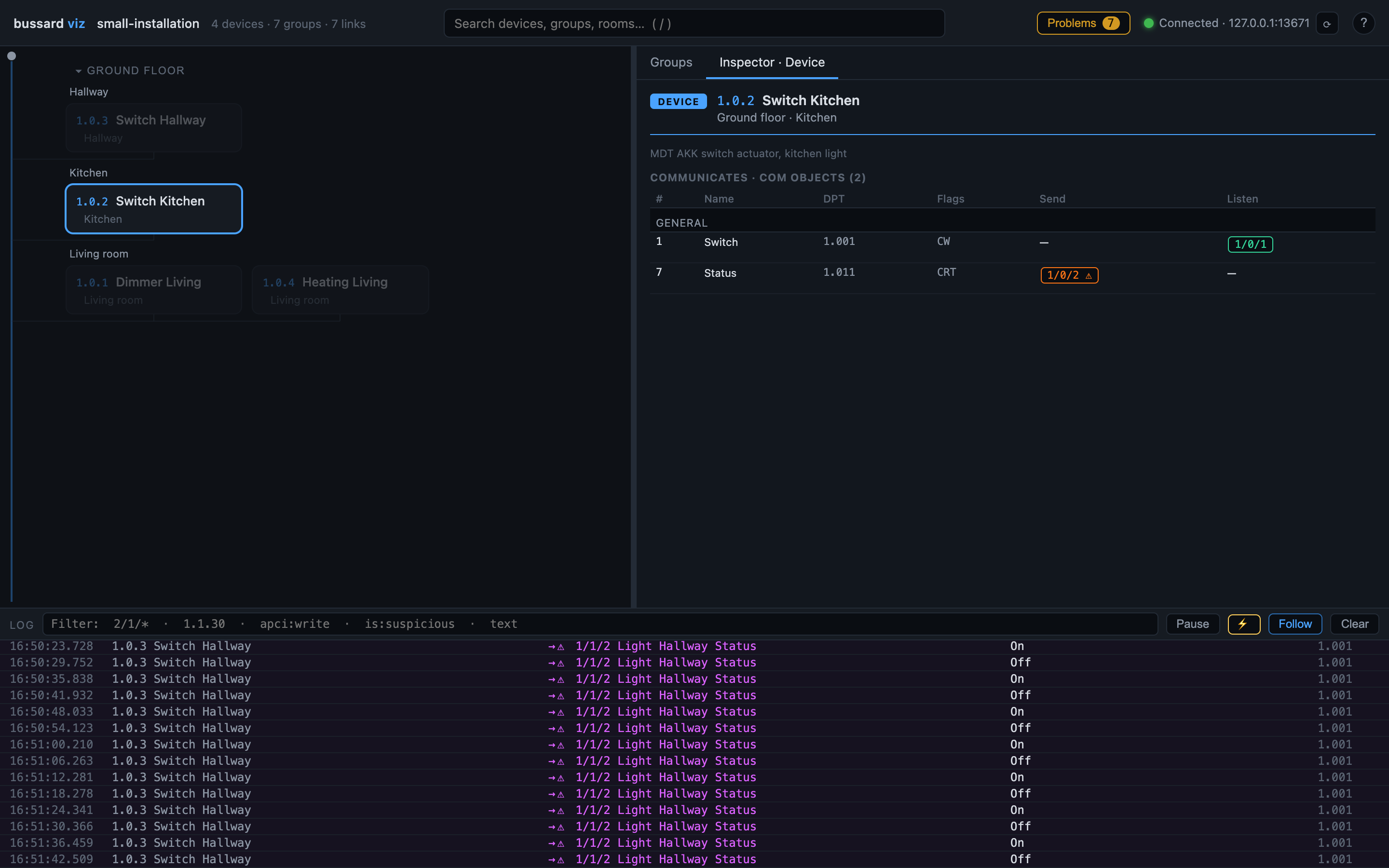
Select a device and the inspector shows its com objects with their types, flags and group addresses:
A bare bussard viz never transmits, so it is safe to point at the live installation. It holds one tunnelling slot of your interface while it runs (see Find what you have).
Warning
--allow-writes arms test-write buttons on the page, and --watch-prog sends a programming-mode query on the bus at intervals. Both transmit. Against a gateway that is not on your own machine the server refuses to start without --allow-remote-gateway. Every armed write asks you to confirm the group address and the gateway, and a protected group address needs a force checkbox on top.
Capture a history and query it
$ bussard capture --to knx/captures/bus.db --filter 3/
Recording to a file is a terminal command too. capture writes every matching telegram into a SQLite file, created if absent. It stores the raw bytes next to the decoded value, so you can decode the history again after you fix a name or a type in your project. --filter works as for monitor, and --keyring decrypts secured telegrams.
Query the file with any SQLite tool:
$ sqlite3 knx/captures/bus.db "SELECT ts_utc, source, destination, apci \
    FROM telegrams WHERE destination = '3/2/0' ORDER BY ts_utc DESC LIMIT 10"
Or give it to the assistant, which then sees telegrams older than its own memory holds:
$ claude mcp add knx -- bussard mcp --dir knx --capture-db knx/captures/bus.db
The table layout is in the JSON and capture reference.
Name group addresses from live traffic
You:        Help me name the group addresses.
Assistant:  Press a button you know, then tell me which one it was.
You:        The ceiling light switch in the kitchen.
Assistant:  (calls knx_wait_for_telegram, then knx_infer_group)
            Device 1.1.30 in the kitchen sent "on" to 1/0/1. Its com
            object declares 1.001 (switch), high confidence.
            I would call it "Kitchen ceiling light, switch". OK?
You:        Yes.
Assistant:  (calls knx_set_group)
            1/0/1 is now Kitchen ceiling light, switch, type 1.001.
knx_wait_for_telegram waits for the press, knx_infer_group ranks the possible types and proposes a name, and knx_set_group writes the one you agreed to. The loop works with a --passive server.
$ bussard learn --untyped --gateway 192.0.2.10

[1/12] 1/0/1: trigger the object you want to name (waiting up to 30s)
  1/0/1  sender 1.1.30 Schaltaktor (Kitchen)
  com object 3 Kanal A - Schalten, channel Ceiling light, declares 1.001
  payload 01 (1 byte(s))
    1. 1.001 [high] the sending com object declares DPT 1.001 in your project
  proposed name: Kitchen ceiling light, schalten
  accept as "Kitchen ceiling light, schalten" / 1.001? [a]ccept, [e]dit name, [d]pt, [s]kip, [q]uit:
learn asks you to press a button, waits for the telegram, and proposes a type and a name. Accept, edit the name, change the type, skip, or quit.
| Flag | What it learns |
|---|---|
--untyped |
Every group address in your project without a type |
--unnamed |
Every group address with a placeholder name |
--ga <GA> |
The addresses you name, in that order (repeatable) |
| none | Whatever appears on the bus next, until a wait times out |
--timeout changes the 30-second wait.
The proposal comes from the sending device's room, channel and com object (one input or output of a device). Press the same button again when the candidates are uncertain: each extra telegram narrows them. Accepted answers go into groups.toml, and into the sending device's file when the com object is clear. Either way nothing is transmitted; only files change. Review the result with bussard validate, or ask the assistant to validate.
Next steps
- Find what you have: list devices, gaps in your project, and what bussard can do with each device.
- Change what a button does: the first write, with plan and undo.
- Bus commands reference: every flag of
monitor,capture,readandlearn.